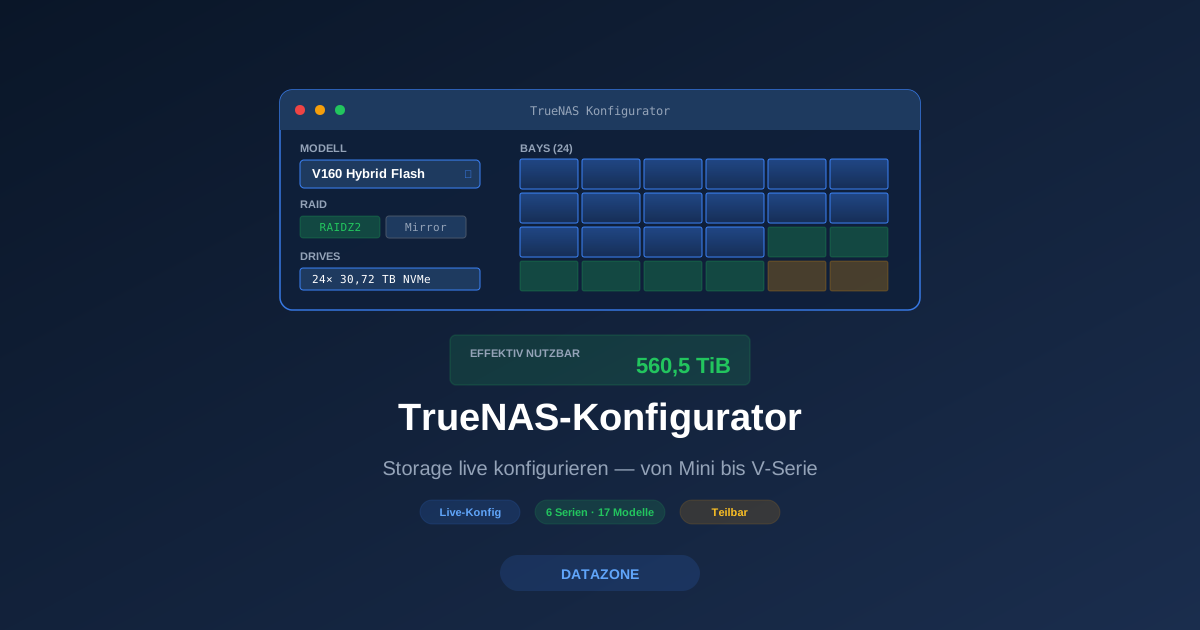
Anyone configuring a TrueNAS system today runs into a familiar set of questions: Which series fits the workload? How many drives of which type go into which bays? What does “effective capacity” actually mean for RAIDZ2 plus compression? How much throughput will the chosen model deliver? Until now this was a back-and-forth between datasheet PDFs, Excel spreadsheets and email enquiries.
With the DATAZONE TrueNAS Configurator, the process now runs live in the browser — covering all six TrueNAS series (Mini, R, H, M, F and V), with real-time capacity calculation and no registration required.
Try it directly: truenas-configurator.com
What the configurator can do
The configurator covers the complete TrueNAS portfolio — from the Mini X for the home office to the V160 with 400 GbE and 60 GB/s throughput:
| Series | Models | Target segment |
|---|---|---|
| Mini | 2 models (X, X+) | SOHO / SMB |
| R-Series | 4 models (R20-R60) | Cost-optimised / All-flash |
| H-Series | 3 models (H10, H20, H30) | Edge / Compact enterprise |
| M-Series | 4 models (M30-M60) | Capacity-optimised, up to 30 PB |
| F-Series | 2 models (F60, F100) | All-NVMe performance |
| V-Series | 3 configurations (V160) | Tri-mode, mission-critical |
For each model, the following components can be assembled freely:
- Drive population: count, capacity and type (HDD, SAS SSD, NVMe) — matched to the available bays of the chassis
- RAID topology: Mirror, RAIDZ1, RAIDZ2, RAIDZ3 or dRAID — with live validation of valid drive counts
- Expansion shelves: ES24, ES60, ES102 or ES24N — depending on platform and model
- Networking options: 1 GbE up to 400 GbE, optical and Base-T, optional Fibre Channel cards
- Cache configurations (where available): SLOG, L2ARC, Special VDEV or dedicated NVMe cache bays on H30 / V-Series
Live capacity calculation
One of the most frequent questions in TrueNAS consulting: “If I put 24× 30 TB NVMe in RAIDZ2 — how much can I actually use at the end?” The configurator answers that in real time. Three values are displayed at once:
- Raw capacity: sum of all drives (24× 30 TB = 720 TB)
- Usable capacity: after parity, ZFS metadata reservation and pool slack (typically 80% of usable ZFS capacity to avoid performance cliffs)
- Effective capacity: including typical compression (LZ4, roughly 1.5–2:1 depending on data type) and optional deduplication
If you want to assume a different compression ratio, you can override the factor manually — the configurator recalculates instantly.
Bay visualisation
Instead of just numbers, the configurator renders the chassis with all bays as an SVG graphic. Each bay is colour-coded:
- Blue: populated with the selected drive type
- Green: hot spare
- Yellow: reserved for cache (SLOG, L2ARC, Special VDEV)
- Grey: empty / not populated
For the V160, the configurator additionally distinguishes between the 24 front bays (tri-mode for SAS HDD or Gen4 NVMe) and the 4 rear Gen5 NVMe bays — the latter exclusively for high-velocity caching. Customers see immediately what their desired setup will look like physically.
Workload-based recommendations
If you do not yet know which series fits, you can pick a workload instead of a model — for example “virtualisation with 50 VMs”, “4K video editing”, “backup target for 100 TB per month” or “AI training pipeline with GPU cluster”. The configurator then proposes two or three matching model configurations and shows the trade-offs:
- A cost-optimised variant (often H-Series or R-Series)
- A performance variant (typically F-Series or V-Series All-Flash)
- A capacity variant (M-Series or V-Series Hybrid Flash)
Recommendations take into account whether high availability is required, whether Fibre Channel is needed, and which throughput class is required.
Shareable configuration codes
Each configuration generates a short, shareable code in the URL — e.g. ?cfg=V160-HF-24NVME30-RZ2-2x400G-1xES24N. Configurations can be shared via email, Slack or ticket comment without screenshots or lengthy descriptions. Whoever opens the link sees the exact same setup with all values.
This is particularly useful in two scenarios:
- Internal alignment workflow: the IT architect shares the configuration with procurement and management — everyone sees the same numbers.
- Technical consulting: the customer shares a link with DATAZONE — we can respond immediately without follow-up questions on specifications.
Data basis: current iX datasheets 2026
All specifications, limits and validation rules are based on official iXsystems datasheets — current as of:
- TrueNAS V-Series Data Sheet (April 2026)
- TrueNAS F-Series Data Sheet (February 2026)
- TrueNAS M-Series Data Sheet (January 2026)
- TrueNAS H-Series Data Sheet (January 2026)
- TrueNAS R-Series Data Sheet (March 2026)
- TrueNAS Mini specifications (truenas.com/truenas-mini/)
Whenever iXsystems updates a datasheet (e.g. new maximum drive capacity, new networking adapter), the configurator is updated. Models that are end-of-life (e.g. R30/R40 or Mini E/XL+) no longer appear — so you cannot click together a configuration that is no longer available in reality.
From configurator to quote
The configurator does not order directly. Instead, every configuration leads to a “Request quote” form with the following fields:
- Pre-filled: the complete configuration including capacity calculation
- Contact details and company
- Desired delivery date
- Additional requirements: on-site commissioning, migration from existing storage, training, SLA preference
DATAZONE turns this into a concrete quote within 1–2 business days — including hardware, TrueNAS Enterprise licence, support package and optional services.
When is the configurator the right tool?
Highly suitable when:
- You roughly know what size you need and want to play through different drive populations.
- You have to align internally and need reliable capacity figures.
- You are comparing TrueNAS against other storage vendors and need a reliable setup quickly for the TCO calculation.
We recommend direct conversation when:
- You are planning a complex migration from existing infrastructure (VMware vSAN, NetApp, EMC)
- Multiple sites with replication and HA requirements have to be coordinated
- You are unsure whether TrueNAS is the right solution at all — we advise vendor-neutrally
In both cases: the configurator is a good starting point to ground the discussion in concrete numbers — the consulting conversation afterwards becomes shorter and more focused.
Availability
- English: truenas-configurator.com
- German: truenas-configurator.de
Both versions are functionally identical, free to use without registration. No tracking cookies are set — only the anonymous configuration in the URL.
Conclusion
Storage configuration is traditionally a PDF-and-Excel process. The TrueNAS Configurator turns it into a live tool that you open in a meeting, jointly tweak a model, and end with a shared link. For us at DATAZONE this means significantly shorter sales cycles and less back-and-forth on specifications. For you it means: in five minutes you can put together a realistic TrueNAS setup — and understand precisely what you will actually get in terms of capacity.
Try it: truenas-configurator.com
More on these topics:
More articles
TrueNAS 27 instead of 26: iXsystems renames the December release — what it means for planning and upgrade paths
iXsystems has renamed the previously-known-as TrueNAS 26 successor to 25.10 Goldeye into TrueNAS 27, just weeks before the December release. What is behind the rename, which tech base is in there (kernel 6.18, OpenZFS 2.4), when GA lands, and how the upgrade path from 25.10 realistically looks.
What Does Storage Really Cost? Cloud vs. TrueNAS Over 5 Years
Cloud storage looks cheap — until egress, API calls and 24/7 retention flip the bill. An honest 5-year TCO comparison: when on-premises TrueNAS pays off, with a worked example and configurator.
TrueNAS as an Immutable Backup Target for Veeam & Proxmox (S3 Object Lock)
Immutable backups against ransomware: how to use TrueNAS as an S3-compatible immutable target with Object Lock for Veeam and Proxmox Backup Server — on-premises, without cloud egress.