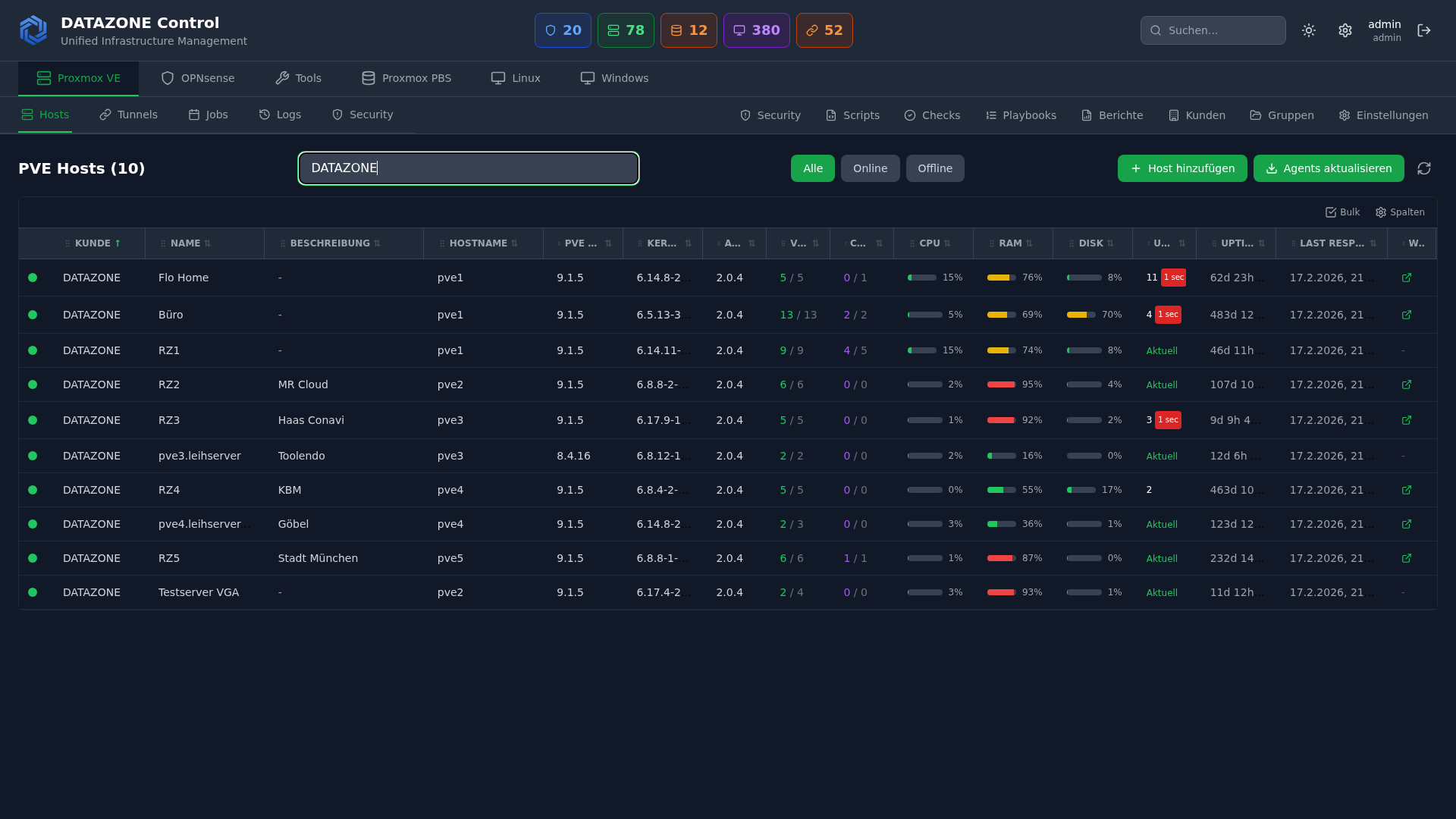
Unpatched systems remain the number one entry point for ransomware and targeted attacks. In 2025 alone, over 30,000 CVEs were published — many with working exploits available within days. At the same time, compliance frameworks like ISO 27001, SOC 2, and NIS-2 require demonstrably regular updates. Manual patching does not scale in heterogeneous environments. DATAZONE Control solves this problem with fully automated patch management that unifies planning, execution, safeguarding, and documentation in a single workflow.
Why Automated Patching Is Non-Negotiable
The window between vulnerability disclosure and active exploitation is shrinking rapidly. Meanwhile, the number of systems to manage keeps growing: on-premises servers, cloud VMs, container hosts, and endpoints. Manual patch rounds tie up IT staff, are error-prone, and leave gaps — whether from forgotten servers or failed updates that go unnoticed.
Automated patch management ensures that every system is updated within the defined timeframe, that the entire process is documented, and that problems trigger an immediate response. It is not a nice-to-have but a fundamental requirement for a resilient IT security strategy.
DATAZONE Control: Patch Management Overview
DATAZONE Control is our central management platform for IT infrastructure. The patch management module covers the entire lifecycle of a patch — from detecting available updates to providing compliance evidence after installation.
Supported Platforms
| Platform | Package Manager | Support |
|---|---|---|
| Debian / Ubuntu | APT | Full (incl. security repos) |
| RHEL / Rocky / AlmaLinux | DNF / YUM | Full (incl. EPEL, errata) |
| Windows Server | Windows Update / WSUS | Full (KB-based) |
Agents run on each system and report available updates, installed versions, and patch status back to the central dashboard in real time.
Patch Policies: Automatic vs. Approval-Based
Not every environment can tolerate the same approach. DATAZONE Control therefore offers two policy models:
Automatic policies are suited for development and test environments as well as non-critical systems. Security updates are installed immediately upon availability — without manual intervention. Feature updates can be handled separately.
Approval-based policies are the standard for production environments. Available patches are collected and presented to the responsible team for review. Only after explicit approval — individually or as a batch — is the installation scheduled. This way you retain full control without losing the overview.
Both models can be configured per server group, site, or operating system and combined freely.
Maintenance Windows and Scheduling
Patches deployed at the wrong time can severely disrupt business operations. DATAZONE Control uses flexible maintenance windows defined per group or individual system:
- Time window: e.g., Saturday 02:00–06:00
- Maximum duration: Abort if the window is exceeded
- Reboot behavior: Immediate, delayed, or only when required
- Blackout periods: Exclude specific time ranges entirely (e.g., year-end close, Black Friday)
Scheduling respects dependencies: database servers are patched before application servers, and load balancers stay last. This prevents cascade failures during maintenance.
Pre-Patch Snapshots with Proxmox Integration
One of the greatest advantages of DATAZONE Control in Proxmox environments is the automatic creation of pre-patch snapshots. Before a single patch is installed, the system triggers a VM snapshot via the Proxmox API. The snapshot captures the complete state of the virtual machine — disks and memory contents.
Patch workflow with snapshot:
1. Maintenance window begins
2. Pre-patch snapshot created (Proxmox API)
3. Snapshot creation confirmed
4. Patches are installed
5. Post-patch validation (service health checks)
6. Success → Snapshot auto-deleted after 48 hours
   Failure → Automatic rollback to snapshot
This mechanism provides a safety net that manual patching can never deliver. Even if a faulty update breaks a service, the previous state is restored within minutes.
Rollback Strategies
A snapshot rollback is not always sufficient. DATAZONE Control supports multiple rollback tiers:
- Snapshot rollback: Full return to the pre-patch state (preferred for VMs)
- Package rollback: Targeted removal of individual packages or KB updates
- Group rollback: Reversal of an entire patch batch across all affected systems
With automatic policies, a failed health check after installation can trigger the rollback without manual intervention. With approval-based policies, the team is notified and decides on the next steps.
Compliance Reporting and Audit Trail
Every action in the patch process is logged without gaps: Who created the policy? Who approved the patch? When was it installed? Was a rollback required? DATAZONE Control generates compliance reports from this data that are directly usable for audits.
Reports include:
- Patch status per system: Current, pending, failed
- Mean Time to Patch (MTTP): Average time from publication to installation
- Coverage rate: Percentage of systems patched within the policy target
- Exceptions: Systems that deviate from the policy — intentionally or otherwise
These metrics are essential for ISO 27001, SOC 2, and the accountability requirements under NIS-2.
Comparison: Manual vs. WSUS/Ansible vs. DATAZONE Control
| Criterion | Manual Patching | WSUS / Ansible | DATAZONE Control |
|---|---|---|---|
| Cross-platform | Yes (with effort) | Partial | Yes (Linux + Windows) |
| Pre-patch snapshots | Manual | Script-based | Automatic (Proxmox API) |
| Automatic rollback | No | Limited | Yes |
| Compliance reporting | Manual | Limited | Built-in |
| Maintenance windows | Calendar-based | Cron jobs | Policy-driven |
| Approval workflow | Email / ticket | Not native | Built-in |
| Scalability | Poor | Good | Very good |
Real-World Patch Workflow
A concrete example: a mid-sized business runs 40 VMs on Proxmox — a mix of Ubuntu web servers, Rocky Linux database servers, and Windows RDS hosts.
- Tuesday morning: DATAZONE Control detects 12 available security updates (8 Linux, 4 Windows)
- Automatic classification: Critical patches (CVSS >= 9.0) are immediately escalated to the team; the rest are queued for the next maintenance window
- Wednesday 10:00: The IT team approves all 12 patches in the dashboard
- Saturday 02:00: Maintenance window begins — snapshots are created, patches are installed
- Saturday 02:45: Post-patch validation: all services responding, health checks passed
- Monday 09:00: Compliance report shows 100% patch coverage, MTTP: 4.5 days
The entire IT team did not lift a finger over the weekend. The process is fully documented and audit-ready.
Monitoring Patch Status Across the Fleet
The central dashboard shows patch status for all managed systems in real time: Which systems are current? Where are updates pending? Which installations failed? Filters by site, operating system, server group, or criticality enable a quick overview — from a single server to the entire infrastructure.
Automatic alerts via email or webhook notify you when critical patches remain uninstalled beyond the defined deadline or when a patch run fails.
Want to automate your patch management and reliably meet compliance requirements? Learn more about DATAZONE Control or contact us — we will show you how automated patching works in your environment.
More articles
TrueNAS as an Immutable Backup Target for Veeam & Proxmox (S3 Object Lock)
Immutable backups against ransomware: how to use TrueNAS as an S3-compatible immutable target with Object Lock for Veeam and Proxmox Backup Server — on-premises, without cloud egress.
Sustainable IT and the ESG Reporting Cascade: what SMB IT really has to deliver in 2026
ESG IT for SMBs: the CSRD cascade, IT share in Scope 1-3, PUE values, server refresh vs continued operation. What your IT needs to deliver for reporting in 2026.
The Cloud Is Not a Backup: On-Premises TrueNAS as Your Resilient Extra Layer
After destroyed data centers, even AWS pointed customers to their own backups. Why an on-premises backup layer with TrueNAS (immutable ZFS snapshots, pull replication, air-gap) is a mandatory part of any data strategy.