Architecture offices are a world of their own in the SMB storage market. File sizes range between small (sketches, detail views) and very large (Revit models, renderings). Retention obligations are long (HOAI, BauO in Germany), and collaboration is classically project-bound — several people work on a plan at the same time, often with sub-consultant involvement. And the versioning question always hangs over everything: “where exactly was the state of last Wednesday before the structural design was changed?”
This article describes a concrete TrueNAS setup for a typical 10–15-person architecture office — based on what we configure at DATAZONE in such houses.
File sizes: what really lands
An honest order of magnitude based on observations from consulting practice:
| File type | Typical file size | Growth |
|---|---|---|
| DWG (AutoCAD) | 5–50 MB | linear with project complexity |
| IFC (BIM exchange) | 50–500 MB | model detail depth |
| Revit (.rvt) | 200 MB – 2 GB | complete building models |
| Archicad (.pln) | 100 MB – 1.5 GB | like Revit |
| Renderings (still) | 50–500 MB | 4K/8K rendering |
| Renderings (animation) | 1–10 GB | longer animations |
| Point clouds (3D scan) | 5–50 GB per scan | on existing-building surveys |
A typical architecture office with 10–15 people produces 2–5 TB of project data in an active year, depending on BIM share and rendering load. Over 10 years of retention this sums up to 20–50 TB of live data plus the same order of magnitude in backup capacity.
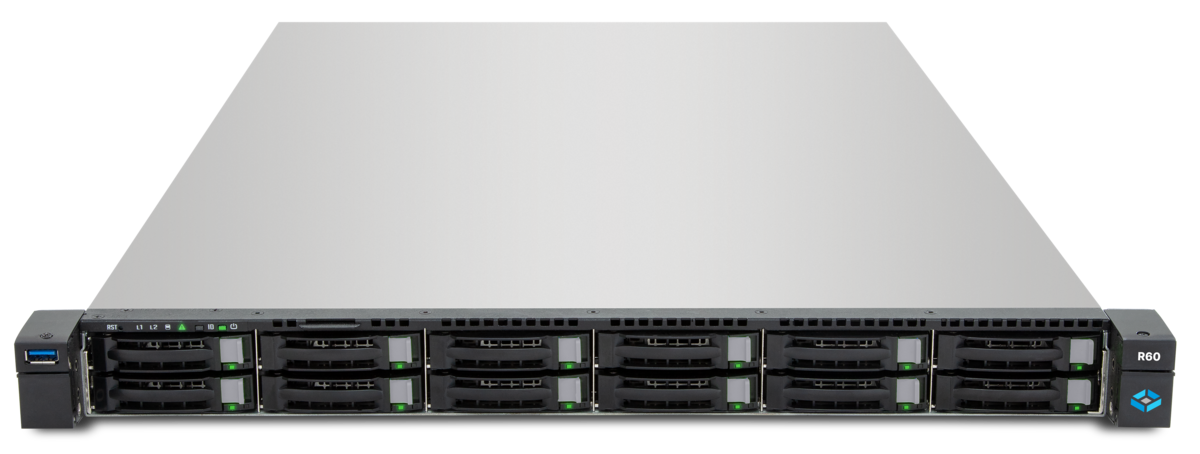
Recommended hardware: TrueNAS H20
For the stated office size the TrueNAS H20 is a well-fitting compromise:
- 12 front bays for HDDs as bulk storage (typically 8× 20 TB SATA as RAIDZ2 for around 100 TB net)
- 2 NVMe bays for Special VDEV/SLOG/L2ARC
- 10 GbE onboard, optionally 25 GbE for renderfarm connection
- Hybrid pool: small files (DWG, office documents) land on NVMe Special VDEV, large files (renderings, Revit models) on HDD bulk
The decisive point for architecture workloads: metadata performance. Anyone with 50,000 DWG files in a project folder profits massively from a Special VDEV that holds metadata on NVMe — browsing goes from “noticeably slow” to “as if on SSD”.
For very large BIM-heavy offices (20+ staff, several large projects in parallel) the H30 with its 24 bays and more NVMe cache is a sensible step up. We recommend the matching pre-build through the TrueNAS configurator.
SMB with ACLs — the access layer
Architecture offices typically work with project groups — 3–6 people are active per project, plus optionally external sub-consultants (structural engineers, MEP, specialist planners). Sensible ACL structure on TrueNAS:
/projekte/
  /2026-001-musterhaus/
    /00_organisation/    (project lead writing, all reading)
    /01_planung/         (architects writing, all reading)
    /02_konstruktion/    (structural writing, all reading)
    /03_tga/             (MEP writing, all reading)
    /04_dokumente/       (project lead writing, external sub-consultants reading)
    /05_archiv/          (read-only after project completion)
Important on TrueNAS:
- Activate NFSv4 ACLs on the dataset (not POSIX rights)
- Inheritance cleanly configured — new files inherit folder ACL automatically
- Writing group-based, not user-based — staff changes are easier this way
- External sub-consultants via separate SMB user with only the necessary project folders
ZFS snapshots as “plan versions”
This is the killer use case for TrueNAS in architecture offices: snapshots before every plan milestone.
Recommendation for the snapshot policy:
- Automatic: daily, 30 days retention
- Automatic: weekly, 12 weeks retention
- Automatic: monthly, 24 months retention
- Manual: before every plan milestone (preliminary design, design, building permit, construction documents, construction execution)
Manual snapshots get a speaking name:
zfs snapshot tank/projekte/2026-001-musterhaus@2026-06-30_building_permit_completedThe advantage: when after three weeks the building owner says “the structural engineer had something at the building-permit state that was different” — the snapshot is there, the state is exactly reconstructable, without version chaos in file names (facade_v01_final_final_2.dwg).
Important: snapshots are read-only point-in-time copies on the same pool. They do not replace a backup — if the pool fails, the snapshots are gone too. Snapshots are a recovery tool, not a backup.
Replication between office and home-office
Many architecture offices have a second site or a home-office practice where large files are occasionally needed. TrueNAS replication covers two use cases:
Use case 1: Backup replication to subsidiary
- Main office: TrueNAS H20 as primary
- Branch or backup site: TrueNAS Mini X+ as secondary
- Replication nightly, pull from the secondary
- Snapshots are replicated too — including manual milestone snapshots
- On the secondary the data state is available with a few hours’ delay
Use case 2: Home-office cache
Harder. Anyone who occasionally needs to work on large files at home has three options:
- VPN plus direct SMB access to the office TrueNAS — works for DWG/IFC, sluggish for large Revit models
- Local sync with tools like Syncthing or a NAS copy at home — risky due to conflicts under parallel access
- Remote desktop to a workstation in the office — the most pragmatic path for CAD/BIM work
We recommend option 3 for demanding CAD/BIM work. For pure plan review and office documents option 1 is enough.
Backup orders of magnitude
Backup is not snapshot. For a 10–15-person architecture office with 2–5 TB of active data and 20–50 TB live inventory we recommend the 3-2-1 backup rule:
- 3 copies of the data (live plus 2 backups)
- 2 media — e.g. TrueNAS replication plus cloud storage
- 1 off-site — physically separated location or cloud
Concrete implementation:
- TrueNAS H20 in the office: live plus snapshots (recovery fast but no backup)
- TrueNAS Mini X+ at the backup site: nightly replication (second physical storage)
- Cloud storage (e.g. Wasabi or Backblaze B2): weekly sync of selected project data plus complete monthly archives
- Immutable layer on the cloud side for ransomware resilience
Budget order: backup cloud costs for 30 TB sit at Wasabi under 200 EUR a month — affordable for any mid-size office.
Retention obligations — HOAI and BauO
Architects are subject to retention obligations that are notably longer than GDPR standard periods:
- HOAI § 3 (4): client documents during contract period, then handover
- State building codes (BauO): typically 5 years for statics and fire protection, longer for special buildings
- Warranty: 5 years after building acceptance — relevant planning data must be available
- Building owner archiving duty: not strictly with the architect but practically it is often expected that data remains accessible there
Practical path in TrueNAS:
- Active projects: full live access
- Completed projects: in
/archiv/dataset, read-only but immediately online - Very old projects (>10 years): in cold-storage replication, online on request
This avoids the main capacity being clogged with archives without making data unreachable.
Typical TrueNAS H20 configuration
Concrete entry-level configuration we often build:
- Chassis: TrueNAS H20 (12 front bays plus 2 NVMe)
- Pool: 8× 20 TB SATA HDD in RAIDZ2 → around 100 TB usable, around 80 TB after 80% slack rule
- Special VDEV: 2× 1.92 TB NVMe mirror → for metadata and small-file optimisation
- L2ARC: optional, often not needed if ARC is sized sufficiently
- RAM: 64–128 GB ECC
- Network: 10 GbE LACP to core switch
- Snapshot schedule: daily/weekly/monthly, manual before milestones
- Replication: nightly to Mini X+ at the backup site
- SMB multichannel: for workstations with 2× 1 GbE or 10 GbE — better throughput distribution
ZFS snapshots complement DMS — they do not replace it
Important clarification: snapshots are not a document management system. They have:
- Point-in-time versions (what was in which folder when)
- Fast recovery
- Low storage cost (copy-on-write)
They do not have:
- Metadata/tags (“this is the approved state for the authority”)
- Workflow status (reviewed, released, archived)
- Linkage with invoices, contracts, correspondence
- Audit trail “who saw what when”
Anyone needing a DMS (typically from around 15–20 staff or with certified processes) uses something like ELO, M-Files or DocuWare in addition to TrueNAS storage. The DMS lives with its documents on the same TrueNAS but profits from snapshots as a recovery layer.
DATAZONE recommendation
Architecture offices are a rewarding use case for TrueNAS. The combination of:
- large capacity (bulk HDDs)
- fast metadata response (NVMe Special VDEV)
- snapshots as a versioning tool
- SMB with AD integration for the workstation world
- replication for backup site
covers 90% of architecture requirements — at a fraction of the cost of commercial vendor solutions.
Anyone migrating from an old Synology/QNAP solution: the path is well established. We migrate in a weekend without notable downtime in the rule, with complete takeover of the permission structure.
Sources and further reading
- TrueNAS H-Series overview — hardware details
Anyone wanting concrete storage consulting for their architecture office: please get in touch — we bring examples from comparable houses.
More on these topics:
More articles
TrueNAS 27 instead of 26: iXsystems renames the December release — what it means for planning and upgrade paths
iXsystems has renamed the previously-known-as TrueNAS 26 successor to 25.10 Goldeye into TrueNAS 27, just weeks before the December release. What is behind the rename, which tech base is in there (kernel 6.18, OpenZFS 2.4), when GA lands, and how the upgrade path from 25.10 realistically looks.
What Does Storage Really Cost? Cloud vs. TrueNAS Over 5 Years
Cloud storage looks cheap — until egress, API calls and 24/7 retention flip the bill. An honest 5-year TCO comparison: when on-premises TrueNAS pays off, with a worked example and configurator.
TrueNAS as an Immutable Backup Target for Veeam & Proxmox (S3 Object Lock)
Immutable backups against ransomware: how to use TrueNAS as an S3-compatible immutable target with Object Lock for Veeam and Proxmox Backup Server — on-premises, without cloud egress.