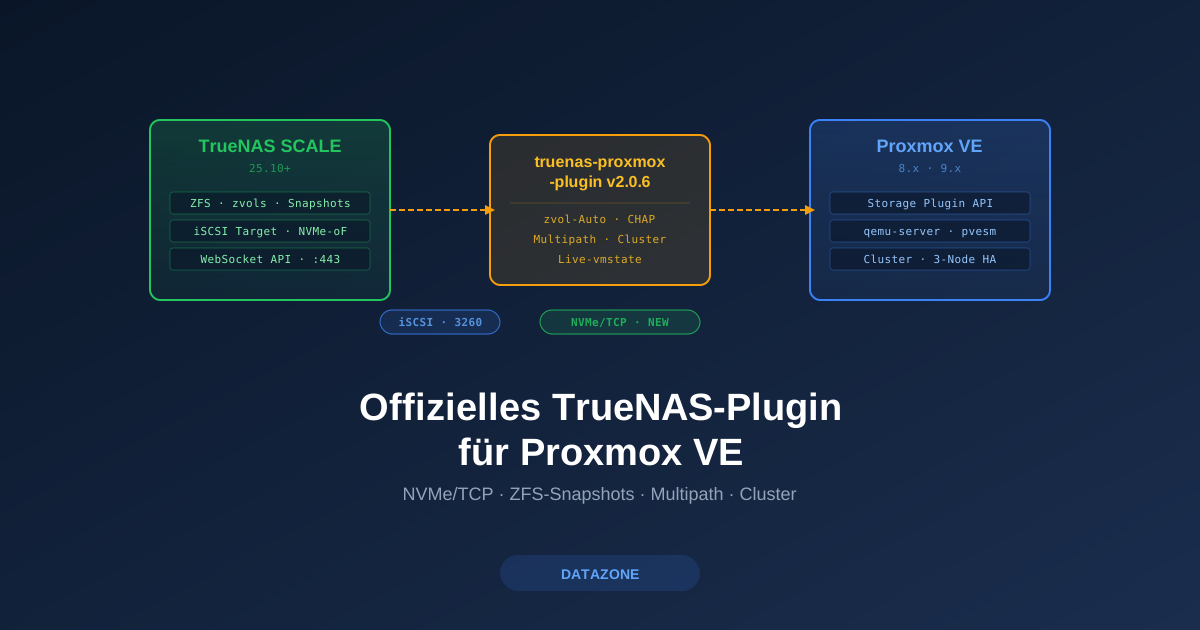
In October 2025 we tested the BoomshankerX plugin — at the time the best community option to integrate TrueNAS cleanly into Proxmox VE. A lot has happened since: iXsystems has been maintaining its own, official plugin at github.com/truenas/truenas-proxmox-plugin since early 2026. It brings features the community plugin lacked — most importantly NVMe/TCP as a transport. According to developers, native integration into the Proxmox WebUI is also imminent.
Here is an honest status report — what has changed, what the new plugin can do, what it cannot do yet, and when a switch is worthwhile.
What’s new?
Until now there were three notable plugin variants:
freenas-proxmox(TheGrandWazoo) — older SSH/REST-based integration for FreeNASboomshankerx/proxmox-truenas— modern WebSocket API integration, kept leanWarlockSyno/TrueNAS-Proxmox-VE-Storage-Plugin— feature-rich community fork with multipath focus
Since February 2026, github.com/truenas/truenas-proxmox-plugin is the official solution developed and maintained by iXsystems itself. The TrueNAS documentation describes the plugin verbatim as “developed and maintained by TrueNAS”. For the first time there is a vendor-supported integration — previously the field was entirely community-driven.
Feature overview
The README lists 14 core features:
| Feature | Meaning |
|---|---|
| Dual transport | iSCSI or NVMe/TCP — selectable per storage entry |
| iSCSI block storage | Classic LUN provisioning over zvols |
| NVMe/TCP support | New transport, requires TrueNAS SCALE 25.10+ |
| ZFS snapshots | Instant, space-efficient via the TrueNAS API |
| Live snapshots (vmstate) | VM snapshots including RAM state |
| Cluster compatible | Full support for Proxmox clusters |
| Automatic volume management | zvol creation, extent/target mapping fully automated |
| Configuration validation | Pre-flight checks before each storage operation |
| Rate-limiting protection | API throttling against overload |
| Storage efficiency | Thin provisioning + ZFS compression (LZ4 etc.) |
| Multi-path support | Native iSCSI multipath configuration |
| CHAP authentication | Optional iSCSI security |
| Volume resize | With pre-flight space check |
| Error recovery | Robust behaviour on API hangs and connection drops |
Source: README in the official repo, as of v2.0.6 (12 March 2026).
NVMe/TCP: the most important leap
The biggest technical change versus the previous generation is NVMe/TCP as an alternative to iSCSI. iSCSI is established and works, but has two structural weaknesses: SCSI protocol overhead in every frame and a single-queue model per session. NVMe/TCP replaces this with the NVMe command set over TCP — multi-queue architecture and significantly lower CPU cost per IOPS.
Verified benchmark data (Blockbridge, Proxmox: iSCSI and NVMe/TCP shared storage comparison — a recognised reference in the Proxmox community):
| Workload | NVMe/TCP vs. iSCSI |
|---|---|
| Small I/O (general) | +30% IOPS, −20% latency |
| 4K random read | +51% peak IOPS, −34% latency |
| QD1 (single thread) | +18% performance |
| Large sequential I/O | practically identical (~0.1% difference) |
Important context: the gains show up mostly with small I/O sizes and low queue depths — exactly where VMs typically live (database commits, metadata operations, OS boot storms). For pure streaming workloads (video render, backup restore) both protocols converge because the bottleneck shifts to the network itself.
We deliberately did not run our own benchmarks without a controlled setup — the figures above are Blockbridge values from a reproducible test, not from our own boxes.
iSCSI or NVMe/TCP — when to use which?
| Scenario | Recommendation |
|---|---|
| Virtualisation with many small VMs | NVMe/TCP — latency gain noticeable per VM boot/login |
| Database VMs (PostgreSQL, MSSQL, MySQL) | NVMe/TCP — sync-write latency particularly important |
| Backup targets, media storage | iSCSI remains valid — bandwidth limited by the network |
| Existing iSCSI multipath infrastructure | Keep iSCSI — plugin manages both in parallel |
| Mixed clusters (old + new PVE nodes) | iSCSI — NVMe/TCP requires PVE 9.x |
NVMe/TCP requires: TrueNAS SCALE 25.10+, Proxmox VE 9.x, and the nvme-cli package on the PVE nodes. Anyone still on PVE 8.x gets iSCSI only.
Advantages over classic integration
The “classic” approach — set up iSCSI manually on TrueNAS, maintain targets/extents by hand, then add an iSCSI storage pool in Proxmox and stack LVM on top — has worked for years. The official plugin removes friction at several points:
1. Fully automatic zvol lifecycle When you create a VM disk in Proxmox, the plugin creates a zvol of the right size on TrueNAS automatically, registers it as an iSCSI extent, maps it into the target and reports the LUN back. Deletion goes the opposite way. Manually that’s a 4-step process per VM disk in the TrueNAS WebUI.
2. Real ZFS snapshots, not qcow2 snapshots Proxmox snapshots on classic iSCSI/LVM are LVM snapshots — functionally limited and with a performance cost. The plugin uses native ZFS snapshots through the TrueNAS API. That means: instant, space-efficient (copy-on-write), and with optional live vmstate including RAM.
3. Multi-node cluster without drift
In a PVE cluster without the plugin, every node has to know the iSCSI configuration itself. The plugin manages the storage definition centrally in /etc/pve/storage.cfg — after a cluster sync all nodes are consistent.
4. CHAP, multipath, rate-limiting out of the box
Instead of manually maintaining /etc/iscsi/iscsid.conf and multipath targets, the plugin manages these aspects through storage parameters. CHAP credentials live in storage.cfg, multipath paths are managed as discovery portals.
5. Pre-flight validation and error recovery Before each destructive operation (volume resize, snapshot rollback) the plugin checks plausibility and free space. API hangs or connection drops are caught with retry logic — instead of leaving half-finished configurations behind.
Native Proxmox WebUI integration: what is known
Current state per README: the plugin is configured via /etc/pve/storage.cfg or the interactive installer. There is no native add-storage form in the Proxmox WebUI yet — the “TrueNAS” storage type has to be added manually or via script.
Discussions in the Proxmox forum thread on the plugin and statements from the TrueNAS environment indicate native WebUI integration in Proxmox VE 9.1 is in preparation. Concretely: TrueNAS would appear as a standalone storage type alongside “iSCSI”, “NFS”, “CIFS” in the PVE selection menu, with its own configuration dialog.
Important context: we have this information from the developer environment — an officially dated announcement from Proxmox Server Solutions GmbH was not available as of 29 April 2026. Anyone needing planning certainty for a migration should wait for the PVE 9.1 release notes.
Version requirements
From the README (as of v2.0.6):
- Proxmox VE 8.x or later (9.x recommended)
- TrueNAS SCALE 25.10 or later (mandatory — no backwards compatibility with 24.x)
- iSCSI port 3260 reachable from PVE node to TrueNAS
- WebSocket API on port 443 (TLS) reachable to TrueNAS
- For NVMe/TCP additionally: PVE 9.x,
nvme-clion every node, NVMe service enabled on TrueNAS
Current official lifecycle status (quote from the TrueNAS docs): “in active development and has not been fully tested. Do not use in production workloads.” The plugin is currently aimed at TrueNAS Community Edition — Enterprise support is announced but not released as of 29 April 2026.
Installation in practice
The simplest method is the official APT repository. On every Proxmox node:
# Place GPG key
mkdir -p /etc/apt/keyrings
curl -fsSL https://truenas.github.io/truenas-proxmox-plugin/apt/pubkey.gpg \
  -o /etc/apt/keyrings/truenas-proxmox-plugin.gpg

# Write deb822 source
cat >/etc/apt/sources.list.d/truenas-proxmox-plugin.sources <<'EOF'
Types: deb
URIs: https://truenas.github.io/truenas-proxmox-plugin/apt/
Suites: bookworm
Components: main
Architectures: amd64
Signed-By: /etc/apt/keyrings/truenas-proxmox-plugin.gpg
EOF

# Install
apt update && apt install -y truenas-proxmox-plugin
On PVE 9.x (Trixie-based) use Suites: trixie instead of Suites: bookworm.
The TrueNAS side needs the following before the first storage attachment:
- Create a dataset for Proxmox volumes, e.g.
tank/proxmox, with compression andatime=off - Enable the iSCSI service under System Settings → Services
- Create an iSCSI target under Shares → Block Shares (iSCSI) → Targets (mode iSCSI, optional CHAP)
- Generate API key under Credentials → Local Users → root → API Key (or better: a dedicated
proxmox-apiuser)
Then add a storage entry in Proxmox /etc/pve/storage.cfg:
truenasplugin: truenas-storage
    api_host 192.168.1.100
    api_key 1-your-truenas-api-key-here
    target_iqn iqn.2005-10.org.freenas.ctl:proxmox
    dataset tank/proxmox
    discovery_portal 192.168.1.100:3260
    content images
    shared 1
All paths from the official Wiki.
Migrating from the BoomshankerX plugin
If you already run BoomshankerX: the official plugin uses a different storage type (truenasplugin instead of truenas), and the configuration files are not binary-compatible. For a migration we recommend:
- Document the existing storage definition (
pvesm status,cat /etc/pve/storage.cfg) - Back up VMs with a migration snapshot — switching the storage driver is not an in-place operation
- Remove the BoomshankerX plugin (
apt purge proxmox-truenas-nativeorproxmox-truenas) - Install the official plugin (see above)
- Add a new storage entry of type
truenasplugin, remove the old one - Move disks via
qm move-diskfrom old to new — snapshots are lost, document them beforehand - Smoke tests with a test VM, then move productive VMs
In a typical mid-sized environment (5–20 VMs) this is a 2–4 hour maintenance window. Anyone planning to use NVMe/TCP needs PVE 9.x anyway — that’s typically the natural moment for the plugin switch.
What’s still missing
Honest list of gaps as of 29 April 2026:
- No official production-ready statement — docs still say “in active development, not fully tested”
- No Enterprise support — TrueNAS Community Edition only, Enterprise on the roadmap
- No native PVE WebUI configuration — expected with PVE 9.1, no official date
- TPM disk storage on iSCSI/NVMe/TCP remains limited: the general TPM snapshot bug (#4693) was fixed in PVE 9.1 — but only for qcow2 TPM disks on SMB/NFS. For iSCSI direct targets the bug is still open (Bug #3662). Workaround: an additional NFS share on TrueNAS for TPM data
- No direct migration path from the BoomshankerX plugin — manual move required
DATAZONE recommendation
Switch now if:
- You are planning a greenfield setup with Proxmox VE 9.x and TrueNAS SCALE 25.10+
- You want to use NVMe/TCP — only the official plugin offers it
- You run test/staging environments where “active development” is acceptable
- You operate clusters with heavy snapshot use — the ZFS snapshot integration is much better than LVM snapshots on classic iSCSI
Wait if:
- Productive environments with enterprise support requirements — until the plugin is officially marked production-ready
- Existing BoomshankerX installations that run stably and don’t need NVMe/TCP — no pressure to migrate now
- You want to wait for native WebUI integration — without an official date, observe 1–2 releases first
We have been testing the plugin in our own lab setups since the 2.0.x series and advise our TrueNAS customers on migration timing. For productive switches we typically suggest combining TrueNAS 25.10 + PVE 9.x + plugin in a single dedicated maintenance window — instead of three separate steps spread across weeks.
Sources
- TrueNAS Proxmox Plugin on GitHub
- README, as of v2.0.6
- Installation Wiki
- TrueNAS Documentation Hub — Proxmox VE Storage Plugin
- Proxmox forum thread on the plugin
- Blockbridge: Proxmox iSCSI vs NVMe/TCP Comparison (source of the NVMe/TCP performance values)
- Our test of the BoomshankerX plugin, October 2025
More on these topics:
More articles
TrueNAS 27 instead of 26: iXsystems renames the December release — what it means for planning and upgrade paths
iXsystems has renamed the previously-known-as TrueNAS 26 successor to 25.10 Goldeye into TrueNAS 27, just weeks before the December release. What is behind the rename, which tech base is in there (kernel 6.18, OpenZFS 2.4), when GA lands, and how the upgrade path from 25.10 realistically looks.
What Does Storage Really Cost? Cloud vs. TrueNAS Over 5 Years
Cloud storage looks cheap — until egress, API calls and 24/7 retention flip the bill. An honest 5-year TCO comparison: when on-premises TrueNAS pays off, with a worked example and configurator.
TrueNAS as an Immutable Backup Target for Veeam & Proxmox (S3 Object Lock)
Immutable backups against ransomware: how to use TrueNAS as an S3-compatible immutable target with Object Lock for Veeam and Proxmox Backup Server — on-premises, without cloud egress.