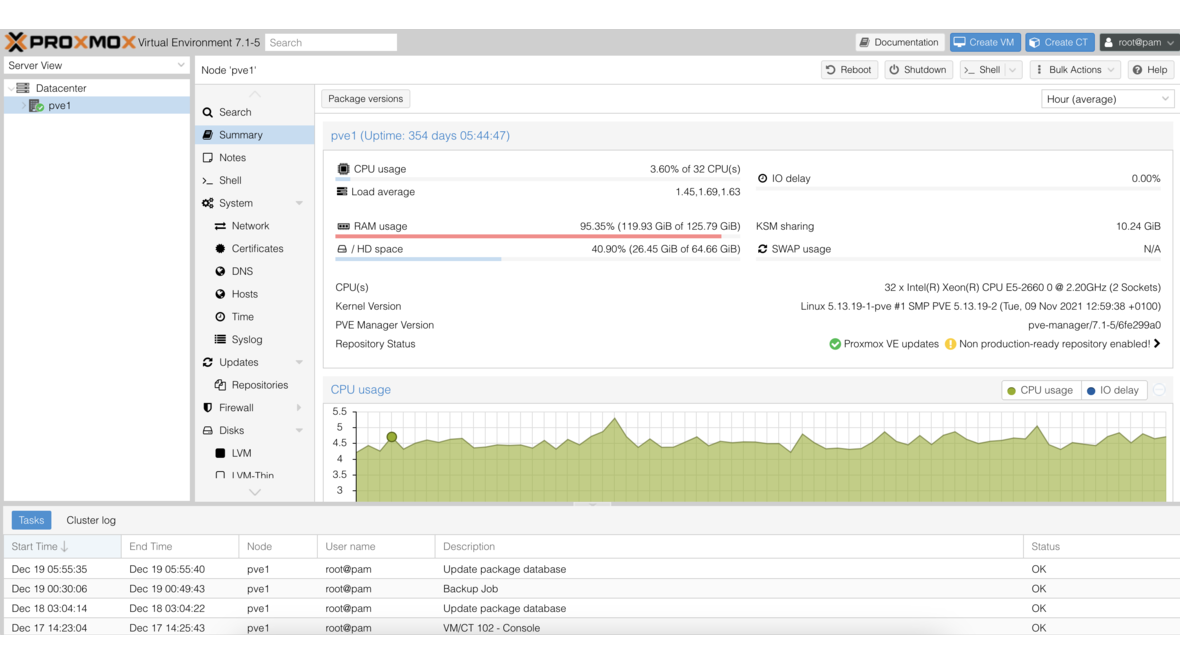
Prometheus collects metrics, Grafana visualizes them — together they form one of the most powerful open-source monitoring stacks available. Unlike all-in-one solutions such as Zabbix, the Prometheus/Grafana stack takes a modular approach: each component does one thing well. This article shows how to build the stack for a typical SMB infrastructure with Proxmox, Linux servers, and OPNsense.
Architecture Overview
┌─────────────┐     ┌─────────────┐     ┌─────────────┐
│ Linux Server│     │ Proxmox VE  │     │  OPNsense   │
│ node_export │     │ pve-exporter│     │ SNMP Agent  │
│  :9100      │     │  :9221      │     │  :161/udp   │
└──────┬──────┘     └──────┬──────┘     └──────┬──────┘
       │                   │                   │
       └───────────┬───────┴───────────────────┘
                   │
            ┌──────▼──────┐
            │  Prometheus  │
            │  :9090       │
            └──────┬──────┘
                   │
            ┌──────▼──────┐
            │   Grafana    │
            │  :3000       │
            └─────────────┘
Prometheus scrapes (pulls) metrics from exporters at a configurable interval. Grafana queries the Prometheus database and renders the results in dashboards.
Installing Prometheus
Installation on Debian/Ubuntu
# Create user and directories
useradd --no-create-home --shell /bin/false prometheus
mkdir -p /etc/prometheus /var/lib/prometheus
chown prometheus:prometheus /var/lib/prometheus

# Download and install Prometheus
PROM_VERSION="2.53.0"
wget https://github.com/prometheus/prometheus/releases/download/v${PROM_VERSION}/prometheus-${PROM_VERSION}.linux-amd64.tar.gz
tar xzf prometheus-${PROM_VERSION}.linux-amd64.tar.gz
cp prometheus-${PROM_VERSION}.linux-amd64/{prometheus,promtool} /usr/local/bin/
cp -r prometheus-${PROM_VERSION}.linux-amd64/{consoles,console_libraries} /etc/prometheus/
chown -R prometheus:prometheus /etc/prometheus
Creating the Systemd Service
# /etc/systemd/system/prometheus.service
[Unit]
Description=Prometheus Monitoring
Wants=network-online.target
After=network-online.target

[Service]
User=prometheus
Group=prometheus
Type=simple
ExecStart=/usr/local/bin/prometheus \
  --config.file=/etc/prometheus/prometheus.yml \
  --storage.tsdb.path=/var/lib/prometheus/ \
  --storage.tsdb.retention.time=90d \
  --web.enable-lifecycle
ExecReload=/bin/kill -HUP $MAINPID
Restart=always

[Install]
WantedBy=multi-user.target
systemctl daemon-reload
systemctl enable --now prometheusBase Configuration
# /etc/prometheus/prometheus.yml
global:
  scrape_interval: 15s
  evaluation_interval: 15s

rule_files:
  - "alerts/*.yml"

alerting:
  alertmanagers:
    - static_configs:
        - targets:
            - "localhost:9093"

scrape_configs:
  - job_name: "prometheus"
    static_configs:
      - targets: ["localhost:9090"]
Setting Up Exporters
node_exporter (Linux Servers)
The node_exporter provides CPU, RAM, disk, network, and hundreds of additional system metrics:
# Installation
NODE_VERSION="1.8.1"
wget https://github.com/prometheus/node_exporter/releases/download/v${NODE_VERSION}/node_exporter-${NODE_VERSION}.linux-amd64.tar.gz
tar xzf node_exporter-${NODE_VERSION}.linux-amd64.tar.gz
cp node_exporter-${NODE_VERSION}.linux-amd64/node_exporter /usr/local/bin/

# Systemd service
cat <<EOF > /etc/systemd/system/node_exporter.service
[Unit]
Description=Node Exporter
After=network.target

[Service]
User=node_exporter
Type=simple
ExecStart=/usr/local/bin/node_exporter \
  --collector.systemd \
  --collector.processes \
  --collector.tcpstat

[Install]
WantedBy=multi-user.target
EOF

useradd --no-create-home --shell /bin/false node_exporter
systemctl daemon-reload
systemctl enable --now node_exporter
Add to Prometheus configuration:
scrape_configs:
  - job_name: "linux-servers"
    static_configs:
      - targets:
          - "server-web-01:9100"
          - "server-db-01:9100"
          - "server-app-01:9100"
        labels:
          environment: "production"
Proxmox VE Exporter
The prometheus-pve-exporter reads the Proxmox API and provides VM status, resource consumption, and cluster metrics:
pip install prometheus-pve-exporter

# Configuration
cat <<EOF > /etc/prometheus/pve.yml
default:
  user: monitoring@pve
  password: "MonitoringPassword"
  verify_ssl: false
EOF

# Systemd service
cat <<EOF > /etc/systemd/system/pve-exporter.service
[Unit]
Description=Proxmox VE Exporter
After=network.target

[Service]
User=prometheus
Type=simple
ExecStart=/usr/local/bin/pve_exporter /etc/prometheus/pve.yml

[Install]
WantedBy=multi-user.target
EOF

systemctl daemon-reload
systemctl enable --now pve-exporter
Prometheus configuration:
  - job_name: "proxmox"
    metrics_path: /pve
    params:
      module: [default]
      cluster: ["1"]
      node: ["1"]
    static_configs:
      - targets:
          - "proxmox-01.local"
    relabel_configs:
      - source_labels: [__address__]
        target_label: __param_target
      - source_labels: [__param_target]
        target_label: instance
      - target_label: __address__
        replacement: "localhost:9221"
SNMP Exporter for OPNsense
OPNsense provides network metrics via SNMP. The SNMP exporter translates these into Prometheus format:
# Install SNMP exporter
SNMP_VERSION="0.26.0"
wget https://github.com/prometheus/snmp_exporter/releases/download/v${SNMP_VERSION}/snmp_exporter-${SNMP_VERSION}.linux-amd64.tar.gz
tar xzf snmp_exporter-${SNMP_VERSION}.linux-amd64.tar.gz
cp snmp_exporter-${SNMP_VERSION}.linux-amd64/snmp_exporter /usr/local/bin/
Enable SNMP in OPNsense: Services > SNMP > Enable SNMP, set the community string.
Prometheus configuration:
  - job_name: "opnsense-snmp"
    static_configs:
      - targets:
          - "192.168.1.1"
    metrics_path: /snmp
    params:
      auth: [public_v2]
      module: [if_mib]
    relabel_configs:
      - source_labels: [__address__]
        target_label: __param_target
      - source_labels: [__param_target]
        target_label: instance
      - target_label: __address__
        replacement: "localhost:9116"
Installing and Configuring Grafana
# Add Grafana repository (Debian/Ubuntu)
apt-get install -y apt-transport-https software-properties-common
wget -q -O /usr/share/keyrings/grafana.key https://apt.grafana.com/gpg.key
echo "deb [signed-by=/usr/share/keyrings/grafana.key] https://apt.grafana.com stable main" > /etc/apt/sources.list.d/grafana.list

apt-get update
apt-get install grafana

systemctl enable --now grafana-server
Adding Prometheus as Data Source
After login (default: admin/admin), go to Configuration > Data Sources > Add:
- Type: Prometheus
- URL:
http://localhost:9090 - Save & Test
Importing Dashboards
Grafana offers thousands of community dashboards. The most important ones for our stack:
| Dashboard | Grafana ID | Description |
|---|---|---|
| Node Exporter Full | 1860 | Comprehensive Linux server dashboard |
| Proxmox VE | 10347 | VM status and cluster overview |
| SNMP Interface | 11169 | Network interface statistics |
| Prometheus Stats | 3662 | Prometheus self-monitoring |
Import via Dashboards > Import > Enter ID > Load.
Building Custom Dashboards
For an SMB overview dashboard, create a new dashboard with these panels:
Server CPU Utilization:
100 - (avg by (instance) (rate(node_cpu_seconds_total{mode="idle"}[5m])) * 100)RAM Usage Percentage:
(1 - node_memory_MemAvailable_bytes / node_memory_MemTotal_bytes) * 100Disk Usage:
(1 - node_filesystem_avail_bytes{mountpoint="/"} / node_filesystem_size_bytes{mountpoint="/"}) * 100Network Throughput:
rate(node_network_receive_bytes_total{device="eth0"}[5m]) * 8Configuring Alerting
Installing Alertmanager
AM_VERSION="0.27.0"
wget https://github.com/prometheus/alertmanager/releases/download/v${AM_VERSION}/alertmanager-${AM_VERSION}.linux-amd64.tar.gz
tar xzf alertmanager-${AM_VERSION}.linux-amd64.tar.gz
cp alertmanager-${AM_VERSION}.linux-amd64/alertmanager /usr/local/bin/
Configuration:
# /etc/prometheus/alertmanager.yml
route:
  group_by: ['alertname', 'instance']
  group_wait: 30s
  group_interval: 5m
  repeat_interval: 4h
  receiver: 'email'

receivers:
  - name: 'email'
    email_configs:
      - to: 'admin@company.com'
        from: 'alertmanager@company.com'
        smarthost: 'smtp.company.com:587'
        auth_username: 'alertmanager'
        auth_password: 'smtp-password'
Defining Alert Rules
# /etc/prometheus/alerts/infrastructure.yml
groups:
  - name: infrastructure
    rules:
      - alert: HighCPUUsage
        expr: 100 - (avg by (instance) (rate(node_cpu_seconds_total{mode="idle"}[5m])) * 100) > 90
        for: 10m
        labels:
          severity: warning
        annotations:
          summary: "High CPU on {{ $labels.instance }}"
          description: "CPU usage above 90% for 10 minutes."

      - alert: DiskSpaceLow
        expr: (1 - node_filesystem_avail_bytes{mountpoint="/"} / node_filesystem_size_bytes{mountpoint="/"}) * 100 > 85
        for: 5m
        labels:
          severity: critical
        annotations:
          summary: "Low disk space on {{ $labels.instance }}"
          description: "Root partition at {{ $value | printf \"%.1f\" }}%."

      - alert: HostDown
        expr: up == 0
        for: 2m
        labels:
          severity: critical
        annotations:
          summary: "Host {{ $labels.instance }} is down"

      - alert: HighMemoryUsage
        expr: (1 - node_memory_MemAvailable_bytes / node_memory_MemTotal_bytes) * 100 > 90
        for: 10m
        labels:
          severity: warning
        annotations:
          summary: "High memory on {{ $labels.instance }}"
Retention and Storage Planning
Prometheus stores metrics locally in TSDB format. Retention is controlled via --storage.tsdb.retention.time:
| Retention | Storage Required (100 metrics, 15s interval) |
|---|---|
| 15 days | approx. 2 GB |
| 30 days | approx. 4 GB |
| 90 days | approx. 12 GB |
| 365 days | approx. 45 GB |
For long-term storage, consider Thanos or VictoriaMetrics as a remote-write backend. Prometheus remains the local collector with short retention (15-30 days), while long-term data resides in a scalable backend.
Comparison: Prometheus/Grafana vs. Zabbix
| Feature | Prometheus + Grafana | Zabbix |
|---|---|---|
| Architecture | Pull (Prometheus scrapes) | Push & pull |
| Data model | Time series (labels) | Items & triggers |
| Visualization | Grafana (excellent) | Built-in (functional) |
| Configuration | YAML / code | Web GUI |
| Auto-discovery | Service discovery | Network discovery |
| Alerting | Alertmanager (flexible) | Built-in (comprehensive) |
| Scaling | Horizontal (Thanos) | Proxies & partitioning |
| Learning curve | High (PromQL) | Medium (GUI-based) |
| Ideal for | DevOps / cloud-native | Traditional IT infrastructure |
For organizations with an existing DevOps culture and container workloads, Prometheus/Grafana is often the better choice. For traditional IT infrastructure with many SNMP devices, Zabbix offers a lower barrier to entry.
Monitoring with DATAZONE Control
DATAZONE Control offers a monitoring solution that combines the strengths of both worlds: automatic agent discovery like Zabbix, flexible dashboards like Grafana, and seamless integration with Proxmox, TrueNAS, and OPNsense. For businesses that need an operational monitoring stack without the configuration overhead of Prometheus/Grafana, DATAZONE Control is the more efficient alternative.
Frequently Asked Questions
Can I run Prometheus and Zabbix in parallel?
Yes. Prometheus and Zabbix do not interfere with each other. Many organizations use Zabbix for traditional infrastructure and Prometheus for container and cloud workloads.
How do I secure Prometheus access?
Prometheus has no built-in authentication. Use a reverse proxy (nginx, Caddy) with basic auth or OAuth2. Alternatively, Grafana provides its own user access controls.
Is Prometheus sufficient without Grafana?
Prometheus has a built-in web UI for ad-hoc queries, but no dashboard functionality. For production monitoring, Grafana is practically indispensable.
Want to build a monitoring stack for your infrastructure? Contact us — we implement Prometheus, Grafana, or DATAZONE Control for your business.
More on these topics:
More articles
TrueNAS Proxmox Plugin exits pre-announcement: early-adopter rollout with signed APT repo
iXsystems has moved the TrueNAS storage plugin for Proxmox VE from pre-announcement to a concrete early-adopter rollout — signed APT packages for Bookworm and Trixie, a cluster-aware installer, multi-tenancy against a single TrueNAS, and official early-adopter status. What is new, what it means in practice, and where the limits are.
Proxmox Datacenter Manager 2026: a practical status after one year
What the Proxmox Datacenter Manager (PDM) really delivers in 2026: multi-cluster overview, central migration, SSO. What is still missing versus vCenter. A practical update from the trenches.
Proxmox licence costs vs. VMware and Hyper-V: an honest 2026 comparison
Proxmox subscription per socket, VMware VVF per core, Hyper-V Datacenter plus CALs: an honest 2026 order-of-magnitude comparison without fabricated EUR figures, based on DATAZONE advisory work.